
Guideline Central (Legacy)
Guideline CentralMedical
3.532.00 Reviews
- Version
- 6.1.1
- Installs
- 50.00K
- Age Rating
- Everyone
Screenshots
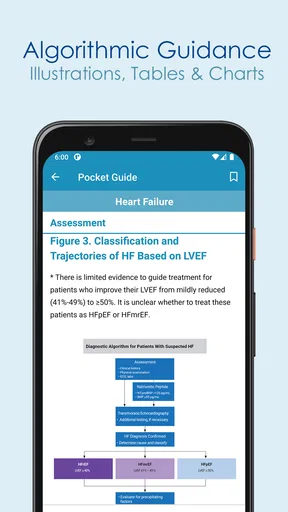
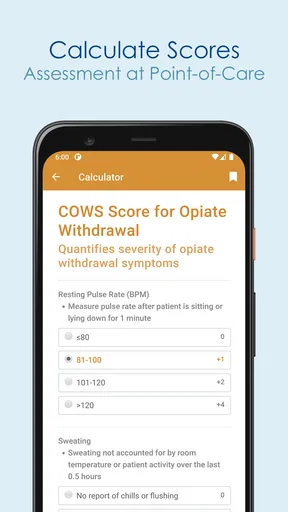
Our Review of Guideline Central (Legacy)
 Analysis by Appyee
When I use a medical reference app, I am not looking for decoration or a long lesson before I reach the information I need. I want clear navigation, sensible presentation, and enough practical material to help me check a guideline or calculation without turning my phone into a second textbook. Guideline Central (Legacy) takes that quick-reference approach. It is a free medical app from Guideline Central, aimed at people who need clinical guidance, calculators, and related reference material in a compact format.
My overall impression is that it works best as a supporting tool rather than a complete replacement for professional judgment, formal training, or a full clinical reference library. Its usefulness depends heavily on how comfortable you are scanning condensed medical content on a phone. The app has a 3.5 average from around 399 ratings, and that feels understandable: the concept is practical, but a concise reference tool can be excellent in a hurry and frustrating when you need deeper explanation or a more guided learning experience.
How the reference experience feels in everyday use
I find the everyday appeal of this reference approach is less about reading more and more about reducing the time spent getting oriented. When I have a focused question, a concise medical resource can help me decide what to check next; the value still depends on pausing to confirm that the guidance fits the situation.
Readability and navigation matter more than visual polish
The strongest part of this kind of app is the ability to bring a focused reference to the moment when I need it. Instead of searching across several browser tabs, I can approach the material as a collection of medical guidelines and calculators designed for quick consultation. That makes the app particularly relevant to clinicians, students, trainees, and other health professionals who already understand the terminology and need a compact reminder.
I would not treat the concise format as a shortcut through a complicated subject. Short sections are helpful when I already know what I am looking for, but they can remove context that would be obvious in a textbook or a long-form guideline. A reader who is unfamiliar with the subject may see a recommendation without immediately understanding its scope, exceptions, or the reasoning behind it. I found that the app is more comfortable for confirmation than discovery.
That distinction changes how I navigate. I first identify the clinical question in plain language, then look for the relevant guideline or calculator instead of browsing without a plan. This reduces the chance of opening a promising-looking section and assuming it answers a different question. It also makes the app less tiring for people who find dense menus or long lists difficult to process.
For users with reading difficulties, the compact presentation can be a mixed experience. Less scrolling may mean less physical effort and fewer opportunities to lose your place. At the same time, condensed medical wording can create a high reading load even when the screen itself looks uncluttered. I would use the app in short sessions, pause between decisions, and keep a separate note of the exact question I am checking.
The important accessibility lesson is that concise does not automatically mean easy. A brief clinical reference can save time for an experienced reader while demanding more interpretation from someone who needs plain-language explanation. Guideline Central (Legacy) is therefore most inclusive when it is used alongside established knowledge, supervision, or another source that explains the background.
Who benefits most from the format
I see the clearest fit for medical students reviewing a topic before class, residents checking a familiar recommendation during a busy shift, and practicing professionals who want a portable point of reference. The app may also suit someone preparing for an exam who prefers quick review blocks over carrying several large resources. Its store presence shows more than 50 thousand installs, which suggests that the compact-reference idea has found a meaningful audience, even though popularity alone does not tell me whether it matches a particular workflow.
People outside healthcare should be more cautious. A medical guideline presented in a concise format is not automatically a diagnosis tool, and a calculator result is not a personal treatment plan. I would not recommend using this app to interpret symptoms, change medication, or make an urgent decision without appropriate professional advice. The Everyone content rating describes the general age suitability of the app, not the complexity or risk of the medical information inside it.
The developer, Guideline Central, has positioned the product around reference material rather than entertainment or general wellness. That focus is useful, but it also means the app does not need to feel conversational to do its job. If you want a tutor that explains concepts step by step, asks questions, or adapts lessons to your mistakes, a dedicated learning app will probably serve you better.
A realistic scenario: checking a recommendation between tasks
Imagine a trainee moving between appointments and trying to confirm a familiar guideline before discussing a case with a supervisor. Opening a concise reference app is more practical than searching the wider web, where results may mix old summaries, promotional pages, and unrelated patient advice. The trainee can use the app to orient the conversation, identify the relevant recommendation, and then verify the details through the institution’s accepted clinical resources.
That workflow has a useful built-in safeguard: the app becomes a prompt for professional discussion rather than the final authority. I would record the topic I checked, note any important qualification, and avoid relying on memory if the situation is unusual. The time saved comes from finding the right reference faster, not from skipping the responsibility to interpret it.
For a student, the same scenario looks different. Before an assessment, I would use a calculator or guideline as a revision checkpoint, then return to lecture notes or a full source to understand why the answer changes under different conditions. This two-stage method is more effective than repeatedly tapping through short summaries without building a mental model.
Motor and sensory considerations
A phone-based reference has an obvious physical advantage: I can consult it without carrying a printed manual. That can help users who find heavy books, loose papers, or desk-based resources inconvenient. Short sessions may also be easier for someone who experiences fatigue from prolonged reading. In my experience, the value comes from keeping the task narrow rather than attempting to read an entire subject inside the app.
However, the same phone format can introduce barriers. Small touch targets, frequent scrolling, glare, and the need to hold a device steady can be difficult for people with limited dexterity, tremor, joint pain, or visual sensitivity. I would not assume that a compact medical interface is comfortable for everyone. A larger screen, a stable stand, and a quiet environment can make a noticeable difference, but those are workarounds rather than qualities I can credit directly to the app.
Users with low vision may find dense text and medical abbreviations demanding, especially when they are working quickly. I would test the app with the device’s available text and display settings, but I would also check whether enlarged text causes more horizontal movement or extra scrolling. Increasing size can improve legibility while making it harder to keep a recommendation and its qualification visible together.
For people who are sensitive to visual clutter, the quick-reference concept may be preferable to a web search full of advertisements and unrelated results. Yet a concise list can still become overwhelming when several similar terms appear together. I recommend entering the session with one clinical question, reading the surrounding context rather than only the first matching line, and taking a short break after a demanding calculation.
Auditory access is another practical consideration. I would not choose this app expecting an audio-first experience. Someone who relies on listening rather than reading may need a separate text-to-speech workflow or an alternative resource that explicitly supports spoken instruction. That does not make the app unusable, but it does make the experience less direct for users whose primary access method is audio.
Situational access: where a quick reference helps
Guideline Central (Legacy) makes the most sense when I have a stable internet-connected routine or a prepared moment to consult a reference. A phone is convenient in a study area, office, or clinical workspace, and the app avoids the distraction of broad web searching. It can also be useful before a meeting, when I want to refresh a topic without opening a large reference system.
In a noisy ward, a crowded transport setting, or a room with poor lighting, the experience becomes less dependable. The problem is not only technical; it is cognitive. Medical decisions require concentration, and a quick-reference screen can be difficult to interpret when interruptions keep breaking attention. I would use it to prepare or confirm a point, not as an excuse to rush through a high-stakes decision while multitasking.
People with limited data access or older devices should think about their routine before depending on it. The current version is 6.1.1 and it requires Android 5.0 or later, so compatibility is reasonable for many Android users, but an older phone may still make reading and navigation less comfortable. I would test the app before placing it in an essential workflow rather than discovering a device or connection problem during an urgent task.
The free entry price is helpful for students and curious professionals who want to evaluate the format without committing immediately. The app also includes in-app purchases ranging from around five dollars to around two hundred dollars per item. That range makes it important to inspect what is available before assuming the free experience contains every reference area you need. A person who wants only occasional quick checks may find the free starting point sufficient, while a regular professional user should compare the cost of desired content with a full guideline service or institutional subscription.
This is one area where the usual alternative may be better. A hospital’s licensed reference platform can offer stronger integration with an existing workflow, while a printed pocket guide can be easier to annotate and review without a screen. A standard web search is broader and often faster for general background, but it requires more judgment to separate reliable medical guidance from outdated or irrelevant pages. The app sits between those choices: more focused than open searching, lighter than a complete reference system, and less explanatory than a textbook.
Three practical habits that improve the experience
My first recommendation is to use the app as a question-driven tool. Before opening it, write or say the exact issue you want to clarify: a definition, a threshold, a calculation, or a recommendation. This prevents aimless browsing and helps you notice when the material is answering a neighboring question rather than your own.
Second, treat calculators as checks on your reasoning, not as automatic answers. Enter the values carefully, confirm the units and assumptions, and ask whether the result makes sense in the clinical context. A calculator can reduce arithmetic mistakes, but it cannot correct a wrong input or decide whether the formula applies to the person in front of you.
Third, read one level beyond the line that appears to answer your question. Concise references often place important qualifications near the main recommendation. I would look for the surrounding explanation, population, or condition before copying a result into notes or repeating it to someone else. This habit is especially valuable for students, who may otherwise memorize a statement without learning when it should not be used.
A fourth habit is to create a personal accessibility routine. I would adjust brightness, use a stable surface, enlarge text only as far as the layout remains manageable, and avoid checking complex material while walking or driving. These steps sound simple, but they turn a general-purpose phone into a more predictable reference station for people with different visual, motor, or attention needs.
Remaining barriers and honest limitations
The main limitation is depth. A concise format is efficient, but it can leave a reader wanting definitions, evidence discussion, examples, or a clear explanation of exceptions. That is not a defect if the app is treated as a quick reference; it becomes a problem when someone expects a complete educational resource. I would skip it as a primary tool if I were learning a subject from the beginning or needed extensive patient-friendly explanations.
Another barrier is interpretation. Medical language compresses meaning into terms that experienced readers recognize quickly. For a multilingual user, a person with limited health literacy, or anyone unfamiliar with the specialty, the app may feel less welcoming than a resource written in plain language. I would prefer a more explanatory alternative when the goal is shared decision-making with a patient or family member.
The purchase structure may also affect inclusion. Free access lowers the initial barrier, but optional items that reach around two hundred dollars can make the broader collection less approachable for independent learners or professionals without institutional support. I would decide based on a specific need instead of buying broadly: identify the guideline or calculator you will actually use, then compare that item with other reference options.
There is also a risk of false confidence. A polished result on a phone can feel more authoritative than it deserves, especially when I am tired or under time pressure. I would always check whether the recommendation applies to the patient group, setting, and question at hand, and I would follow local policy when it differs. The app can support a decision process, but it should not replace supervision, current clinical judgment, or emergency services.
Finally, the word “Legacy” in the product name is worth taking seriously as a user-experience signal. I would approach the app as an established reference product that needs a practical trial, not as a guarantee that every modern accessibility expectation or workflow integration will be present. Before relying on it daily, I would test navigation with the exact topics I handle, see how comfortable the screen is during a normal shift, and confirm that the available content matches my field.
Who should install it, and who should look elsewhere
I would recommend trying it if you are a healthcare student, trainee, or professional who values concise guideline summaries and calculators in a portable format. The free price makes experimentation easy, and the app can reduce the friction of reaching a focused reference instead of searching the entire internet. It is especially suitable for people who already know how to judge medical sources and want a fast reminder rather than a lesson.
I would look elsewhere if you need a fully accessible audio experience, extensive plain-language teaching, robust note-taking, or a single all-inclusive reference library. I would also avoid making it my only resource for urgent care, unfamiliar diagnoses, or decisions that require detailed patient-specific interpretation. A full clinical database, institutional resource, textbook, or qualified professional may be the better choice depending on the situation.
My inclusive verdict
Guideline Central (Legacy) is a useful medical reference companion when its limits are understood. I like the focused idea: guidelines and calculators are easier to approach on a phone than a scattered collection of browser pages, and the compact format can help experienced readers save time. The app is free to start, rated for Everyone, and maintained by Guideline Central, with more than 50 thousand installs showing that it serves a real need.
Its accessibility story is more practical than comprehensive. A portable screen can support different locations and reduce the burden of printed material, but dense terminology, touch interaction, visual concentration, and paid content can still exclude people depending on their abilities and circumstances. I would judge it by my own workflow: can I find a familiar topic, read it comfortably, check a calculation carefully, and verify the result without rushing?
My final advice is to use it as one layer in a safer reference routine. Let it help you locate and refresh information, then bring in the fuller source, local guidance, or professional oversight that the situation requires. For the right reader, that balance makes the app genuinely handy. For anyone seeking a teaching tool, a patient-facing explanation, or a highly specialized accessibility experience, another option will likely be more supportive.
Verdict
Strengths of Guideline Central (Legacy)
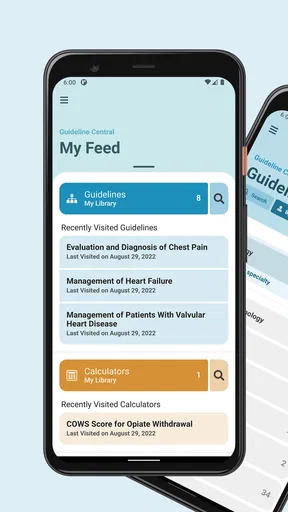
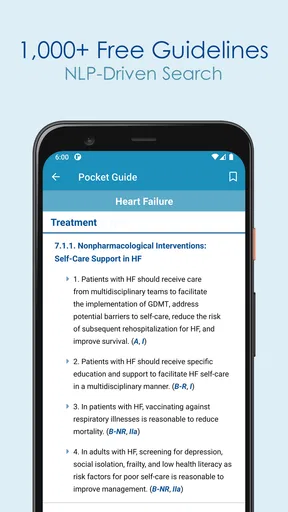
- Quick access to clinical guidelines in one mobile library.
- Useful for reviewing recommendations during patient care or study.
- Search tools help locate specific topics more efficiently.
- Content is organized by medical specialty and guideline source.
- A practical companion for users who already have Guideline Central access.
Limitations of Guideline Central (Legacy)
- Many features may require a paid subscription or institutional access.
- The Legacy app may have limited updates compared with the newer platform.
- Some guideline content can be restricted by specialty or account type.
- Not a substitute for professional judgment or complete clinical references.
- Interface and compatibility may feel dated on newer devices.
Similar Picks in This Category
View All
WebMD: Symptom Checker
WebMD, LLC4.1

Microphone Amplifier
DOSA Apps4.2

Anatomy Learning - 3D Anatomy
3D Medical OU4.5

Period Tracker and Calendar
SimpleInnovation4.9

GoodRx: Prescription Coupons
GoodRx4.8

CVS Health
CVS Pharmacy4.5
Frequently Asked Questions
What is Guideline Central (Legacy) used for?
Guideline Central (Legacy) is designed to help healthcare professionals access clinical guidelines, recommendations, and medical reference content in a more convenient format. It can be useful when reviewing evidence-based information during preparation, study, or clinical decision-making. However, the app should be treated as a reference resource rather than a replacement for professional judgment, institutional policies, current research, or advice from a qualified healthcare provider.
Is Guideline Central (Legacy) suitable for patients and general users?
Although some of the information may be understandable to patients, Guideline Central (Legacy) is primarily aimed at healthcare professionals, students, and users who need structured clinical reference material. Medical terminology and recommendations may require specialist knowledge to interpret correctly. Patients should avoid using the app to diagnose themselves or change treatment without speaking with their doctor, since individual circumstances may differ from the guidance presented.
Does Guideline Central (Legacy) require an account or subscription?
Access requirements may vary depending on the specific guideline or resource you want to view. Some content may be available without payment, while other materials can require registration, a subscription, or an institutional arrangement. Because this is a legacy version, availability and account compatibility may also differ from newer Guideline Central services. Check the app’s current store listing and in-app information before downloading if access costs are important to you.
Can the app be used without an internet connection?
Offline availability depends on the content and features supported by the installed version of Guideline Central (Legacy). Certain resources may need an internet connection to download, update, or display correctly, while previously accessed material might remain available locally. If you plan to use it in a hospital, classroom, or travel setting with unreliable connectivity, test the required guidelines in advance rather than assuming the entire library will work offline.
Is the information in Guideline Central (Legacy) always current?
Clinical guidelines can change as medical evidence, recommendations, and professional standards are updated. A legacy application may not provide the same update schedule, features, or content coverage as the current Guideline Central platform. Before relying on any recommendation, check its publication or revision date and compare it with official guidance from the relevant medical organization. The app is best used as a convenient reference, not as the sole source for urgent or high-risk decisions.
